Ooops, I forgot to mention in my previous post: my member name on Renderosity is Prof_Null: once you are signed in, go to the "Members" menu and use "Member Search" to find me.
There is a LOT of artwork there btw, check out the galleries, it just keeps coming every day.
2013-03-31

Where to find my latest work
I see that I have people that actually follow this blog - well, thanks folks. If you want to see my latest works you need to go to Renderosity and then if you want to see my work you will need to create an ID and password for the site. Sorry if this is a hassle, I know I am fed up with passwords etc. and f it were not for my browser remembering them all for me I would not bother! It is worth it though:
Here is one pic from my ongoing series made using models from Renderosity and DAZ:

By using purchased models, sets and props I am finally getting some results I am happy with, leading to a 3D Graphic novel. As I have said before, the amount of work required to properly complete even one model is huge, so for me the DAZ/Poser system is really the only way to go. I still have to make various bits and pieces myself, for example the footprints in the image above are modelled and the ground has holes in it for the footprints to sink into, and I just can't get a decent spaceship so I'm still having to do some things myself - but the results are good enough for me. Now if I could just get that twelve core beast of a PC I have been saving for, I might be able to create some animations . . . . .
well, okay, maybe next year at this rate. I'll probably forget about doing animation anyway - comic books are quite enough of a challenge. It seems that some folks have lots of time for art but I still have to work for a living.
Here is one pic from my ongoing series made using models from Renderosity and DAZ:

well, okay, maybe next year at this rate. I'll probably forget about doing animation anyway - comic books are quite enough of a challenge. It seems that some folks have lots of time for art but I still have to work for a living.
2013-03-02
NO Projection Paint?
Since version 2.49 Blender has gradually improved . . . except that it sometimes loses features.
For a while there was no Knife tool but it is now back as of 2.65.
I never thought of Projection Painting as a "feature" though - more like an essential element - but it does not seem to be there any more.
I posted on BlenderArtists Forum asking for any help on how to use Projection paint in 2.6x versions and received zero replies.
There does not seem to be any tutorials for it and the 2.6 wiki is mostly empty: how the Blender lords expect anyone to use their software is a mystery to me.
What is Projection Paint? think of it as being able to paint a photo flat on the side of your model.
It really is very useful and can't be replaced easily by another method.
I'm not happy. Blender has been my preferred modeller but this is the first time I have run into a serious feature fail.
For a while there was no Knife tool but it is now back as of 2.65.
I never thought of Projection Painting as a "feature" though - more like an essential element - but it does not seem to be there any more.
I posted on BlenderArtists Forum asking for any help on how to use Projection paint in 2.6x versions and received zero replies.
There does not seem to be any tutorials for it and the 2.6 wiki is mostly empty: how the Blender lords expect anyone to use their software is a mystery to me.
What is Projection Paint? think of it as being able to paint a photo flat on the side of your model.
It really is very useful and can't be replaced easily by another method.
I'm not happy. Blender has been my preferred modeller but this is the first time I have run into a serious feature fail.
2012-12-24
Dead downloads

2012-07-22
The Longhauler

It would be good to have someone else to help with the work, but I'm not holding my breath on that one.
I plan to make it an ongoing story with "chapters" for sale online once it gets to a good enough level of quality - and it might be my "retirement project": it might not make much money, but at least I will enjoy doing it.
I was put off the whole idea for a while by the sheer size of the job but recently there was one thing which got me back into it: DAZ Studio. DAZ is free and although some criticise it as being too simple and inflexible, I don't care: what it does do is make it easy to put human (or other) characters in a scene, dress and pose them and get a decent image from it. Personally, making humans in Blender (for example) is a lot of work and complicates an already complex task - and that is ignoring any actual story or the niceties of plotting or setting up scenes visually.
What isn't free in the DAZ/ Poser system is the models: you buy characters and clothes and that is good for someone like me who sees the extra time and complexity as unwanted compared to the prices for premade outfits.
Of course, you can make your own or just make new textures for existing models (which I do a bit) and that gets around the limits of what's available too - ultimately, it's flexible enough for my needs.
Although I could already fill a page with the problems and adventures of using DAZ, I won't bother here - suffice to say my main complaint is the same one I have with Blender: Where is the documentation, guys? Both these programs have been updated but the user guides are either non-existent or yet to be written. I sometimes wish they would just stick with one version and iron out the bugs, and write a good user manual rather than rewriting the whole thing.
I guess what you are supposed to do is be on the forums every day, digging up the howtos from everyone else etc. etc. The trouble is, then I don't end up doing any actual creative work - and it is all too easy to do that.
So, The LongHauler? it carries 6 SCC's (Space Cargo Containers) at a speed of about 50 Km/h across fairly rough land. It will be seen travelling across a planet that has very stormy weather - so there is pretty much no air travel. The weather also discourages people going outside much and so there is a walkway from front to back inside the chassis to the engine room in the rear section. In the front is the driving room (bridge?) upstairs and crew quarters/ bunkroom downstairs.
I chewed over the suspension and steering geometry and got it to turn in it's own length, but although it does not need roads, it does have limited suspension travel (you can see that in the rough render above) - really it is not designed for mountain climbing.
It should have no trouble fording deep rivers though, and with those huge individually driven wheels, soft ground or sand will not be a problem.
This is till a rough sketch. As mentioned above, there is a LOT of work in even a relatively simple 3D model - add the surface detail ("paint") and the setting, and there are a lot of hours into what seems to the uninitiated a simple scene.
Ah, but that is the way with humans: it all looks easy when you have not tried to do it yourself.
2012-01-27
Mobile Home 2
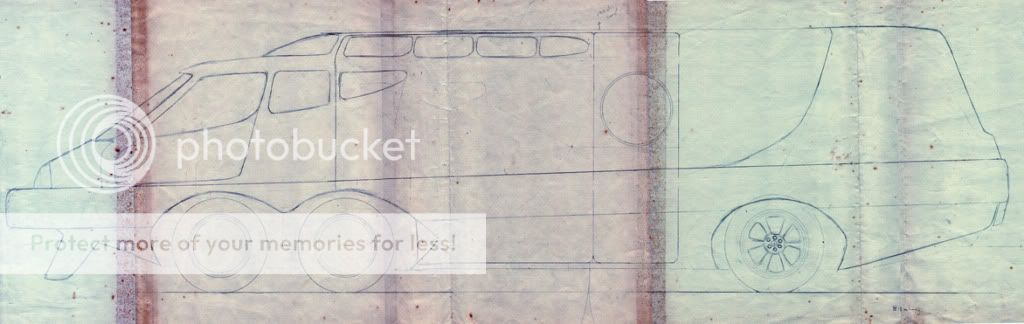
Here is the second version.
 Sorry about the quality, it really is ancient and you can see where the sticky tape held the pages together. This time I made sure that you could walk upright in the back of it and although you can see the similarity to version one, it is much bigger. the spoiler-like thing under the front looks a bit tacked on now. the whole side of this one was designed to slide out and make a fair sized living space in the middle area.
Mobile Home 1, circa 1974
This was my first attempt to design a mobile home that didn't look like an overinflated van or a box on wheels. Among other things it featured four front driven wheels, a truly huge windscreen and nice big bumpers for crash absorbing. Built in jacks would extend for parking and parts of it would expand to provide more room.

The weight of that huge windscreen was on my mind so I thought maybe you would have a second real safety glass one inside at a more reasonable size and angle, and the outer one would be lighter, thinner plastic just for the aerodynamic sleekness.
As you can see it was drawn on the center two pages from an exercise book as all my early drawings were. Unfortunately most of my early drawings are long lost, although some were sold to a friend on the schoolbus !
After careful consideration I reasoned that this vehicle would really be too small to live in so I started design work on a bigger machine, which will be seen next post.

The weight of that huge windscreen was on my mind so I thought maybe you would have a second real safety glass one inside at a more reasonable size and angle, and the outer one would be lighter, thinner plastic just for the aerodynamic sleekness.
As you can see it was drawn on the center two pages from an exercise book as all my early drawings were. Unfortunately most of my early drawings are long lost, although some were sold to a friend on the schoolbus !
After careful consideration I reasoned that this vehicle would really be too small to live in so I started design work on a bigger machine, which will be seen next post.
Subscribe to:
Posts (Atom)